Build Molecules - Molecule Lab: A Comprehensive Review
Screenshots


Introduction
Build Molecules - Molecule Lab is an innovative and interactive chemistry learning application developed by jruanobl. This app caters to students, educators, and chemistry enthusiasts, allowing them to explore and construct molecular structures in an engaging manner. With its user-friendly interface and robust features, Build Molecules transforms the often complex subject of chemistry into an accessible and enjoyable experience. The app enables users to build molecules through a drag-and-drop interface, automatically forming bonds between atoms based on their valence rules, making it an excellent tool for learning and experimenting with molecular chemistry.
Graphics & Gameplay
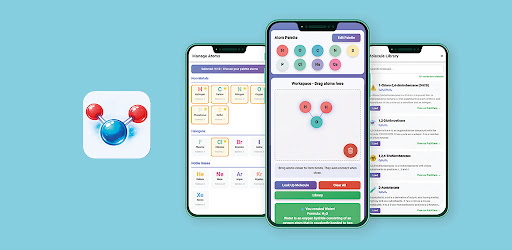
The visual design of Build Molecules - Molecule Lab is both appealing and functional. The app features a clean, intuitive interface that allows users to focus on molecule construction without unnecessary distractions. The atom palette is organized into distinct categories, enabling users to quickly find the elements they need. The workspace is spacious, allowing for easy manipulation of atoms, and the real-time bond rendering provides immediate visual feedback, enhancing the overall experience. Screenshots demonstrate vibrant colors and clear representations of molecules, making learning visually engaging. The app is responsive, adapting well to both mobile and larger screen formats, ensuring that users can enjoy a seamless experience regardless of their device.
Key Features
- Drag-and-Drop Building: Users can easily construct molecules by dragging atoms from the atom palette into the workspace, compatible with touch and mouse controls.
- Smart Chemical Bonding: Atoms automatically bond when they are close enough, following established valence rules with support for single, double, and triple bonds.
- 40+ Atoms in 8 Categories: Explore a diverse selection of over 40 atoms, including non-metals, halogens, noble gases, and more, complete with their symbols, names, and valence values.
- 100+ Molecule Recognition: Instantly identify over 100 known molecules, such as H2O, CH4, and more, along with detailed information and direct links to PubChem.
- Molecule Library: Access a built-in library of predefined molecules that can be loaded into the workspace for study or modification.
- Custom Atom Palette: Personalize your atom palette with up to 10 atoms for quicker access and construction.
- Visual Bond Rendering: Bonds are displayed in real-time, providing users with immediate visual support when forming complex structures.
- Educational Support: Real-time molecular formula generation using the Hill system aids in understanding chemical compositions.
Mod Features
For those seeking an enhanced experience, various mod features can significantly elevate the app's functionality. Here are some potential mod features:
- Premium Unlocked: Gain access to all premium features without any restrictions, allowing for an uninterrupted learning experience.
- No Ads: Enjoy a completely ad-free environment, ensuring that your focus remains on constructing and learning about molecules.
- Unlimited Money: Unlock unlimited resources within the app, enabling you to customize your atom palette without limitations.
- Exclusive Atoms: Access rare and complex atoms that are not available in the free version, allowing for more advanced molecule construction.
How to Install APK on Android
Installing the Build Molecules - Molecule Lab APK on your Android device is straightforward. Follow these steps:
- Download the APK: Click on the download link provided below to obtain the latest version of the app.
- Enable Unknown Sources: Go to your device's Settings, navigate to Security, and enable the option to install apps from unknown sources.
- Locate the APK File: Use a file manager app to find the downloaded APK file in your device's Downloads folder.
- Install the APK: Tap on the APK file and follow the on-screen instructions to complete the installation process.
- Launch the App: Once installed, find the app icon in your app drawer, tap it, and start exploring the fascinating world of molecular chemistry!
Call to Action
Ready to dive into the world of molecular chemistry? Download Build Molecules - Molecule Lab now and start building molecules today! Click here to access the download link and enhance your chemistry skills through interactive learning.