
DrumKnee 3D Drums - Drum Set: An In-Depth Review
Screenshots


Introduction
DrumKnee 3D Drums - Drum Set, developed by Paulo R Ribeiro, is a revolutionary mobile drumming app that seeks to provide users with the most realistic drumming experience possible. Launched in its latest version 1.9.9, this app allows you to engage in drumming like never before. By leveraging your phone or tablet's accelerometer, you can lay it on your knee and use your foot to play the bass drum, making it feel like you have a real drum set at your fingertips. With the ability to record and share your creations, as well as the innovative Splitteroo integration for custom drum kits, DrumKnee is perfect for aspiring musicians and seasoned drummers alike. Whether you’re on the go or just looking to practice, this app provides an immersive and engaging experience.
Graphics & Gameplay
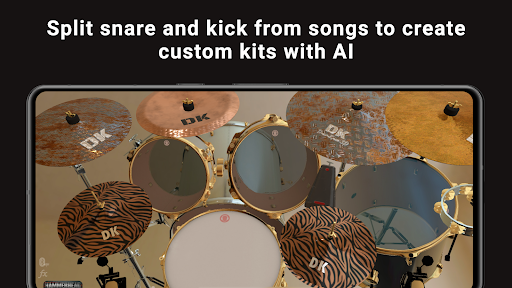
The visuals of DrumKnee 3D Drums are striking and sleek. The app features a well-polished 3D interface that immerses users into a virtual drumming environment. The vibrant colors and detailed graphics contribute to a modern aesthetic that appeals to both casual users and serious musicians. Screenshots reveal a beautifully rendered drum set complete with various drum types, cymbals, and customizable skins that enhance the overall user experience.
Gameplay is intuitive and fluid, with a responsive touch interface that ensures minimal latency between your taps and the sounds produced. The app's design allows for chokable cymbals, which means you can hold your finger on them to create unique sound effects as you play. The visual feedback during gameplay is satisfying, as the drums react in real time to your actions, making it feel as if you're playing an actual drum set. Overall, the graphics and gameplay of DrumKnee 3D Drums combine to create an engaging drumming experience that is both fun and functional.
Key Features
- Realistic Drum Sounds: The app boasts professionally recorded audio that mimics the sound of real drums, ensuring that your practice sessions sound authentic.
- Low Latency: DrumKnee is designed for minimal delay between your taps and the resulting sounds, providing a seamless drumming experience.
- Custom Drum Kits: With Splitteroo integration, users can create personalized drum sets by removing drums from their favorite tracks, allowing for a tailored drumming experience.
- Recording and Sharing: Users can record their performances and share them with the DrumKnee community or on social media, fostering a vibrant musical environment.
- Stylish Skins: The app offers various skins to choose from, allowing users to customize the look of their virtual drum set.
- Play Along with Drumless Songs: Users can jam along with select tracks that have the drums removed, enhancing their skills and providing a unique practice opportunity.
- Chokable Cymbals: Hold your finger on the cymbals to create unique sounds, adding more versatility to your drumming.
- Subscription Service: The DK Music service allows users to download drumless tracks directly to the app, providing more options for practice and play.
Mod Features
For those looking to enhance their experience even further, here are some plausible mod features that could be included in an unofficial version of DrumKnee 3D Drums:
- Premium Unlocked: Access all premium features without the need for a subscription, allowing you to enjoy the full functionality of the app.
- No Ads: Enjoy an uninterrupted drumming experience without ads disrupting your practice sessions.
- Unlimited Money: Use unlimited in-app currency to purchase additional drum kits, skins, and features without any restrictions.
How to Install APK on Android
Installing the DrumKnee 3D Drums APK on your Android device is a straightforward process. Follow these steps to get started:
- Enable Unknown Sources: Go to your device's Settings, navigate to Security, and enable the option for 'Install unknown apps' for the browser or file manager you will use to download the APK.
- Download the APK: Visit the official link to download the DrumKnee 3D Drums APK file directly: Download DrumKnee 3D Drums APK.
- Locate the APK: Open your file manager and navigate to the folder where the APK was downloaded.
- Install the APK: Tap on the APK file to begin the installation process. Follow the prompts to complete the installation.
- Open the App: Once installed, open DrumKnee 3D Drums from your app drawer and start drumming!
Conclusion
DrumKnee 3D Drums - Drum Set is undoubtedly a standout app for anyone interested in drumming, whether you are a beginner or an experienced drummer. Its realistic sound quality, intuitive interface, and innovative features like foot-triggered bass and custom drum kits provide an unparalleled drumming experience on a mobile device. If you're looking for a fun, engaging, and effective way to practice and record your drumming, this app is a must-try.
Ready to get started? Download DrumKnee 3D Drums today and unleash your inner drummer!