
Screenshots


Introduction
Mob3DMod is a sophisticated mobile application designed for engineers, designers, manufacturing professionals, and anyone who frequently interacts with 3D models. Developed by Nyamix, this app provides a comprehensive toolset for precise measurements and in-depth analysis of 3D models, ensuring users can perform professional-grade evaluations right from their mobile devices. With robust support for various CAD formats and a user-friendly interface, Mob3DMod promises to be an essential companion for those needing accurate and detailed 3D model interactions.
Graphics & Gameplay
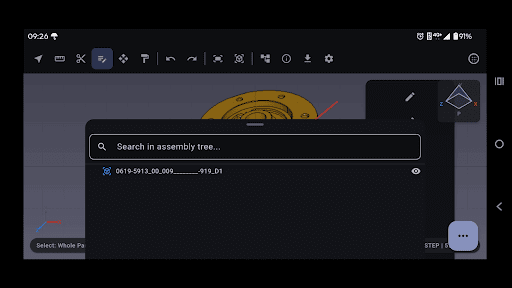
The visuals in Mob3DMod are striking and highly functional. Users are greeted with a modern, touch-friendly interface that allows for seamless navigation and interaction with 3D models. The application features smooth orbiting, panning, and zooming, which gives a responsive feel to the 3D environment. Screenshots reveal a clean layout with a well-organized assembly tree that allows users to expand, collapse, and search through model components effortlessly. The use of standard views, isometric perspectives, and a walk-through mode for large-scale models showcases the application’s capability to handle complex assemblies elegantly. Overall, the graphics are not only visually impressive but also contribute significantly to the app's functionality, making it easy to view and manipulate intricate designs.
Key Features
- Broad CAD Format Support: Mob3DMod supports various file formats including STEP, IGES, BREP, STL, OBJ, glTF/GLB, PLY, and VRML, enabling users to open and view models from multiple sources effortlessly.
- Precise Measurements: The app offers true engineering accuracy with features that allow point-to-point measurements, angles, radii/diameters, edge lengths, and much more, making it a reliable tool for professional analysis.
- Interactive 3D Viewport: Users can enjoy a fully interactive viewport with smooth navigation options, including zoom to fit, perspective/orthographic toggles, and a walk-through mode for larger models.
- Full Assembly Navigation: The XDE-based assembly tree allows users to manage and analyze components efficiently, with rich metadata available for each part, including volume, surface area, and material properties.
- 3D Model Exporting: Users can export their models to various formats for 3D printing or sharing, ensuring versatility in usage and collaboration.
- User-Friendly Interface: Built with Flutter and Open Cascade Technology, the app provides a modern, intuitive interface designed for seamless touch interactions.
Mod Features
While the original app is already powerful, modded versions of Mob3DMod can offer additional enticing features to enhance the user experience:
- Premium Unlocked: Enjoy all the features of Mob3DMod without restrictions, giving you access to the full suite of measurement and analysis tools right out of the box.
- No Ads: Experience uninterrupted model viewing and analysis with a mod that removes all advertisements, allowing for a focused and professional workflow.
- Unlimited Money: Use in-app resources without limits, enabling you to unlock advanced features and tools that would otherwise require in-app purchases.
- Enhanced Export Options: Get access to additional file formats and higher quality export settings, making it easier to share your models in various environments.
How to Install APK on Android
Installing the Mob3DMod APK on your Android device is a straightforward process. Follow these steps to get started:
- Download the APK: Click on the following link to download the Mob3DMod APK: Mob3DMod Download.
- Enable Unknown Sources: Before installation, ensure that your device allows installations from unknown sources. Go to Settings > Security > Unknown Sources and enable it.
- Locate the Downloaded APK: Use a file manager to navigate to your device's download folder and find the downloaded Mob3DMod APK file.
- Install the APK: Tap on the APK file and follow the on-screen instructions to complete the installation process.
- Launch the App: Once installed, locate the app icon on your home screen or app drawer and tap to launch Mob3DMod.
Conclusion
Mob3DMod stands out as an invaluable tool for professionals working with 3D models, providing high-precision measurements and an intuitive interface. Whether you're an engineer, designer, or hobbyist, this app equips you with the necessary features to analyze and manipulate models effectively. With potential mod features enhancing the experience even further, Mob3DMod is definitely worth considering. Don't miss the opportunity to elevate your 3D modeling capabilities—download Mob3DMod today!
Call to Action: Click here to download Mob3DMod and take your 3D modeling skills to the next level!