
Screenshots
Introduction
Photo Summary, developed by Isaac Insoll, is an innovative mobile application designed for photography enthusiasts who want to enhance their images by showcasing the camera settings used to capture them. With version 2.1.0, this app provides an intuitive interface that enables users to effortlessly create visually appealing images containing essential EXIF data, making it a valuable tool for both amateur and professional photographers. The app is particularly inspired by photography communities that emphasize the importance of sharing knowledge, such as "Learn to Light - An OCF Lighting Community." Notably, Photo Summary is a one-time purchase app without any in-app purchases or advertisements, reflecting the developer's commitment to providing a seamless user experience.
Graphics & Gameplay
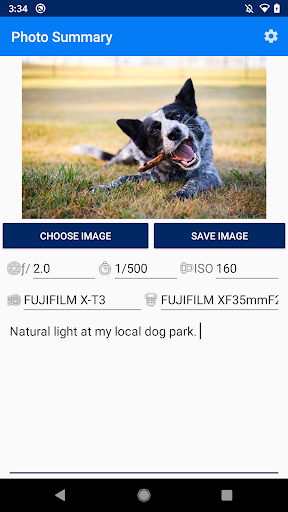
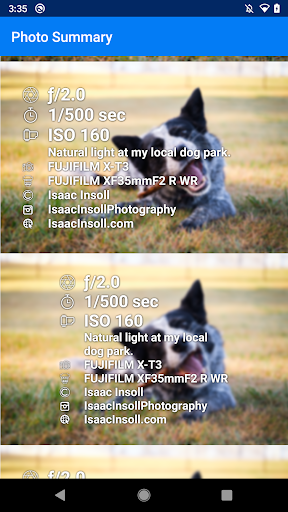
The visual design of Photo Summary is clean and user-friendly, making it easy for users to navigate through its features. The screenshots reveal a minimalistic interface that prioritizes functionality while maintaining aesthetic appeal. Users can expect to see vibrant images with customizable overlays that display camera settings in a stylish manner. The app's design choices effectively highlight the photographs, with options to select from various templates that cater to different tastes and preferences. The overall user experience is smooth, and the app’s layout ensures that users can focus on their photography rather than navigating complex menus.
Key Features
- Easy Photo Selection: Users can quickly select an image from their gallery, including photos transferred from a PC via Google Drive, making the process swift and efficient.
- Camera Settings Display: The app reads the EXIF metadata embedded in the image, automatically extracting important camera settings such as aperture, shutter speed, ISO, and lens type.
- Custom Note Addition: Users have the option to add personal notes or adjust settings before saving the final image, allowing for a personalized touch.
- Multiple Design Options: With a variety of design templates, users can choose their favorite style to enhance the visual appeal of the image, making it more shareable on social media platforms.
- No In-App Purchases or Ads: As a one-time purchase app, users can enjoy all features without the annoyance of ads or the pressure of additional costs.
- Regular Updates: The developer is committed to providing regular updates to introduce new features and templates, ensuring that the app remains relevant and useful.
Mod Features
- Premium Unlocked: Access all premium design templates and features without any restrictions, allowing users to take full advantage of the app's capabilities.
- No Ads: Enjoy an uninterrupted editing experience without any advertisements, making the workflow smoother and more enjoyable.
- Unlimited Designs: Unlock an unlimited number of design choices, providing users with endless possibilities for customizing their images.
- Enhanced Sharing Options: Directly share edited images to various social media platforms with a single tap, making it easier to showcase your work.
- Advanced Note Features: Additional options for formatting notes, including font styles and colors, to further personalize the presentation of camera settings.
How to Install APK on Android
Installing the Photo Summary APK on your Android device is a straightforward process. Follow these steps to get started:
- First, ensure that your device allows installations from unknown sources. To do this, go to Settings > Security > Unknown Sources and toggle it on.
- Next, download the Photo Summary APK file from a trusted source. You can find it through the official link provided in the download section below.
- Once the APK file is downloaded, navigate to your device's Downloads folder using a file manager app.
- Tap on the Photo Summary APK file to initiate the installation process.
- Follow the on-screen prompts to complete the installation. Once installed, you can find the app icon in your app drawer.
- Open the app, and you’re ready to start creating beautiful photo summaries!
Conclusion
Photo Summary is a unique and valuable tool for photographers looking to document and share the settings used in their images. Its user-friendly interface, combined with its essential features, makes it a must-have app for anyone passionate about photography. With the developer's commitment to continuous updates and the absence of in-app purchases, Photo Summary stands out as a reliable choice for enhancing your photography experience.
Ready to enhance your photography? Download Photo Summary today! Visit the official download link here.