
Regain: Study Timer for Focus - Detailed Review and Download Guide
Screenshots


Introduction
In a world where distractions are just a tap away, staying focused can be a challenge, especially for students and professionals alike. Enter Regain: Study Timer for Focus, an innovative app developed by EpowerX Labs designed to combat phone addiction and enhance productivity. With its powerful app blocker, focus timer, and unique features, Regain helps users reclaim their time and build healthier digital habits. Whether you're preparing for exams or simply looking to minimize distractions, Regain promises to help you reduce screen time by up to 25% in just one week.
Graphics & Gameplay
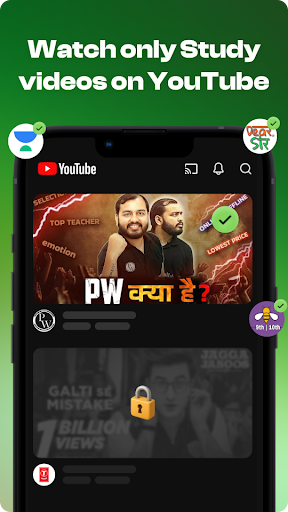
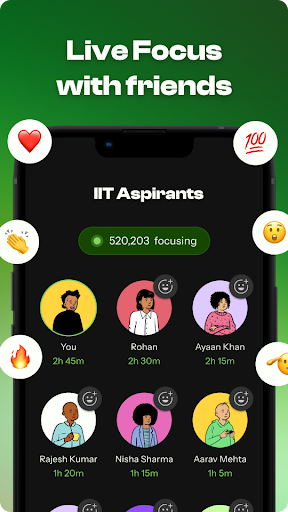
Regain's interface is sleek and user-friendly, making it accessible for all ages. The app showcases a modern design with calming colors that promote focus and concentration. The main dashboard presents various tools and functionalities, such as the focus timer, app blocker, and screen time tracker, in an organized manner. Screenshots from the app depict vibrant graphics featuring:
- Focus Timer: Clear visual indicators for timer settings and remaining time.
- Multiplayer Focus Rooms: Engaging layouts that showcase participants and their progress on global leaderboards.
- Screen Time Insights: Graphical representations of productive vs. distracted time, aiding users in understanding their habits.
- Customization Options: Various themes and calming music settings that enhance the study environment.
- Strict Mode Features: Visual cues that indicate when the app is actively blocking distractions.
Overall, Regain combines functionality with appealing aesthetics, making it an enjoyable tool for enhancing focus.
Key Features
- Focus Timer: The app offers several modes including Timer, Stopwatch, and Pomodoro methods, complete with customizable focus and break durations.
- Multiplayer Focus Mode: Connect with friends or classmates in live focus rooms, compete on leaderboards, and share accountability.
- App Limits with Strict Mode: Set daily limits on distracting apps, ensuring that once activated, users can't disable them until the timer runs out.
- Website Blocker: Block adult sites and other distractions to maintain a focused browsing experience.
- Screen Time Insights: Analyze your digital habits through detailed reports, allowing you to track progress and identify areas for improvement.
- YouTube Study Mode: Tailor your viewing experience to only include educational content, effectively blocking distracting channels and videos.
- Schedule Planner: Organize and plan your focus sessions, creating routines that foster consistency and discipline.
Mod Features
For those seeking an enhanced experience, several creative mod features could make Regain even more appealing:
- Premium Unlocked: Gain access to all premium features without the need for a subscription, including advanced analytics and additional customization options.
- No Ads: Enjoy an uninterrupted experience while using the app, devoid of any advertisements that could disrupt focus.
- Unlimited Money: In a hypothetical scenario, users might unlock unlimited resources to customize their experience further, such as premium themes and soundtracks.
- Enhanced Strict Mode: An advanced version of strict mode could include features like facial recognition to ensure users are genuinely engaging with their work and not finding ways to bypass the app.
How to Install APK on Android
Installing the Regain app via APK is straightforward. Here’s a step-by-step guide:
- Enable Unknown Sources: Go to your device's Settings > Security > Enable 'Install from Unknown Sources'.
- Download the APK: Click on the provided download link to get the Regain APK file.
- Locate the File: Use a file manager to navigate to the Downloads folder where the APK file is saved.
- Install the APK: Tap on the APK file and follow the on-screen instructions to install the app.
- Open Regain: Once installed, launch the app and set up your account to start your journey towards improved focus.
Conclusion
Regain: Study Timer for Focus is a highly effective tool for anyone looking to improve their focus and reduce phone addiction. With its user-friendly interface, powerful features, and engaging multiplayer functionality, it stands out as a go-to app for students and professionals alike. Don't let distractions take control of your time; download Regain now and take the first step towards a more productive life.
Download Regain: Study Timer for Focus now from the following link: Download Regain