Screenshots

Introduction
TurboScan™: PDF Scanner is an innovative app developed by Piksoft Inc. that transforms your Android device into a powerful multipage scanner. This user-friendly application allows you to efficiently scan documents, receipts, notes, whiteboards, and photos, converting them into high-quality multipage PDF or JPEG files. Unlike many scanning apps that come with recurring fees, TurboScan offers a one-time purchase option, making it a cost-effective solution for anyone needing a reliable scanning tool. The free version allows users to scan and send up to three multipage documents, providing a taste of its robust features.
Graphics & Gameplay
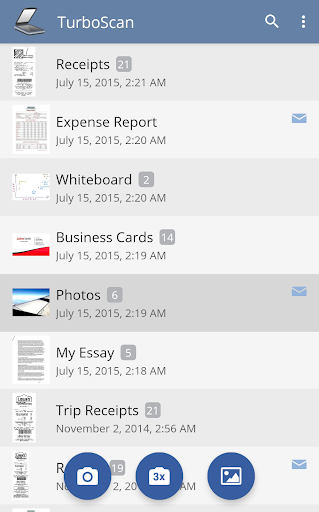
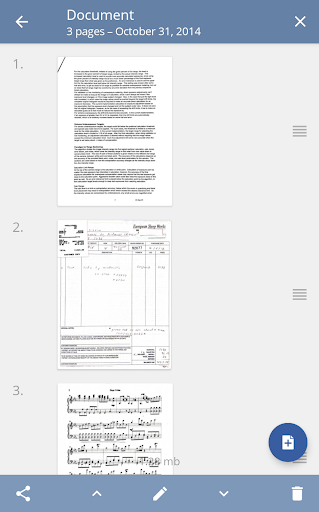
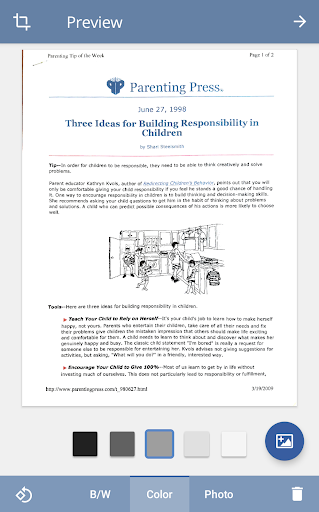
The graphical interface of TurboScan is sleek and intuitive, designed to enhance user experience. The app showcases a clean layout with easy-to-navigate options. The main screen presents users with clear icons for scanning, importing images, and accessing saved documents. The vibrant graphics make it easy to differentiate between features like brightness and color controls. The visuals are optimized for clarity, ensuring that scanned documents maintain high fidelity. The screenshots highlight a seamless scanning process with real-time previews, making it simple to adjust settings before finalizing scans. The use of contrasting colors enhances usability, allowing users to focus on their documents without distractions.
Key Features
- Automatic Document Edge Detection: TurboScan uses advanced algorithms to automatically detect and correct document edges, ensuring that your scans are perfectly aligned.
- SureScan Mode: This proprietary scanning mode captures three images of the same document to create sharper scans, particularly useful in low-light conditions.
- Ultra-Fast Processing: Each page is processed in under three seconds, making scanning quick and efficient.
- Multipage Editing: Users can add, reorder, or delete pages from their scans, providing flexibility in document management.
- Comprehensive Export Options: Export your documents as PDFs, JPEGs, or PNGs, and easily send them via email or upload to cloud storage solutions like Dropbox and Google Drive.
- Email to Myself Feature: Quickly send your scans to a predefined email address with a single tap.
- Instant Brightness and Rotation Controls: Adjust brightness, rotation, and color settings on-the-fly for optimal results.
- Offline Processing: All processing occurs on your device, ensuring data confidentiality without needing an internet connection.
Mod Features
While TurboScan offers a comprehensive set of features in its standard version, hypothetical mod versions could enhance the user experience even further. Some plausible mod features might include:
- Premium Unlocked: Access to all advanced features without the need for in-app purchases, ensuring that users can utilize the app to its fullest potential.
- No Ads: Experience uninterrupted scanning without any advertisements, providing a smoother workflow and a more professional feel.
- Unlimited Scans: Remove limitations on the number of multipage documents that can be scanned and sent, allowing for extensive use without restrictions.
- Advanced Filters: Additional filters and enhancement options for scanned documents, enabling users to customize their scans further.
- Cloud Storage Integration: Seamless integration with more cloud storage services for easier document management and backup.
How to Install APK on Android
Installing the TurboScan APK on your Android device is a straightforward process. Follow these steps to get started:
- Download the APK: Visit the official download link to obtain the TurboScan APK file.
- Enable Unknown Sources: Before installation, navigate to your device's settings, go to 'Security,' and enable 'Install from Unknown Sources' to allow the installation of apps outside of the Google Play Store.
- Locate the APK: Open your file manager and find the downloaded TurboScan APK file.
- Install the App: Tap on the APK file to begin the installation process. Follow the on-screen prompts to complete the installation.
- Launch TurboScan: Once installed, you can find the TurboScan app in your app drawer. Tap to open and start scanning your documents!
Conclusion
TurboScan™: PDF Scanner is an exceptional tool for anyone in need of a reliable document scanning solution. Its feature-rich interface, ease of use, and high-quality output make it a standout choice in the crowded scanning app market. Whether you're a student, professional, or simply someone who needs to digitize documents quickly, TurboScan delivers on all fronts. With a straightforward installation process and no recurring fees, it represents great value for money.
Ready to turn your phone into a powerful scanner? Download TurboScan™: PDF Scanner now! Visit the link below to get started: