
Wallflow - Living Wallpapers Review and Download Guide
Screenshots



Introduction
Wallflow - Living Wallpapers is a dynamic and innovative app developed by LengthOfRope that revolutionizes the way users experience wallpapers on their Android devices. This unique application offers a collection of self-contained living wallpapers, providing a captivating visual experience that goes beyond static images. With options ranging from generative visuals to retro CRT phosphor pieces, Wallflow allows users to personalize their home screens with beautifully animated backgrounds. The app is free to install and comes with a starter pack, while additional themed packs can be purchased to expand your wallpaper collection.
Graphics & Gameplay
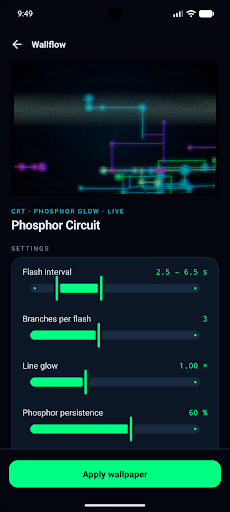
The graphics in Wallflow are nothing short of mesmerizing. The screenshots reveal a vibrant array of animated wallpapers that showcase the app's capabilities. Users can expect to see:
- Generative Visuals: Dynamic and fluid animations that react to user interactions, creating a living canvas on your home screen.
- Retro CRT Phosphor Pieces: Nostalgic designs reminiscent of classic arcade games, complete with glowing traces and self-playing game scenes like Snake and Pong.
- Photo-Backed Wallpapers: Users can animate their own pictures, transforming personal memories into lively backgrounds with effects like parallax depth and weather animations.
- Deep Customization: The ability to tweak various settings such as speed, color, and density in real-time, ensuring that each wallpaper is uniquely tailored to the user's preferences.
The overall aesthetic is striking, with a perfect blend of modern and retro styles that invites users to explore and interact with their wallpapers in a way that feels both fresh and nostalgic.
Key Features
- Diverse Wallpaper Packs: Wallflow features a variety of themed packs, including the "Photos Vol. 1," "Arcade Vol. 1," "Calm & Organic Vol. 1," "Energy & Neon Vol. 1," and "Retro-tech Vol. 1," catering to different tastes and moods.
- Real-Time Customization: Every wallpaper can be adjusted with sliders for speed, density, color, and more, allowing users to see changes live before applying them.
- Privacy Focused: The app boasts no ads, no tracking, and no unnecessary permissions, ensuring a seamless and private user experience.
- Cross-Device Compatibility: Purchases are tied to the user's Google account, allowing access on any device logged into that account, along with a restore feature for easy transitions between devices.
- Performance Optimization: Wallflow utilizes hardware-accelerated rendering, pausing animations when the screen is off to conserve battery life.
Mod Features
While Wallflow is a feature-rich app in its own right, hypothetical mod features could enhance the user experience even further. Here are some plausible mod features:
- Premium Unlocked: Access all premium wallpaper packs without additional purchases, offering a comprehensive library of dynamic backgrounds at no cost.
- No Ads: Enjoy an uninterrupted experience with no advertisements, allowing for seamless browsing and application of wallpapers.
- Unlimited Money: Instantly unlock any wallpaper pack without limitations, giving users the freedom to choose any design they desire without concern for costs.
- Enhanced Customization Options: Additional sliders and settings for even deeper control over wallpaper aesthetics and interactions.
How to Install APK on Android
Installing the Wallflow APK on your Android device is a straightforward process. Follow these steps to get started:
- Enable Unknown Sources: Go to your device's Settings > Security, and enable the option to install apps from unknown sources. This allows you to install APK files outside of the Google Play Store.
- Download the APK: Click the download link provided below to save the Wallflow APK file to your device.
- Locate the APK: Use a file manager app to navigate to your Downloads folder and find the Wallflow APK file.
- Install the APK: Tap on the APK file to initiate the installation process. Follow the on-screen instructions to complete the installation.
- Open the App: Once installed, locate the Wallflow app in your app drawer and launch it to start customizing your wallpapers!
Download Wallflow - Living Wallpapers
If you're ready to transform your Android device with stunning living wallpapers, download Wallflow - Living Wallpapers now and explore a world of animated creativity at your fingertips!